Wazuh Ultimate Installation + Custom Rules
SIEM/XDR | Server + Agents (Win/Linux/macOS) | 70+ Custom Detection Rules (100200-102499)

Ashish Patil
Cybersecurity Architect | Wazuh & Detection Engineering
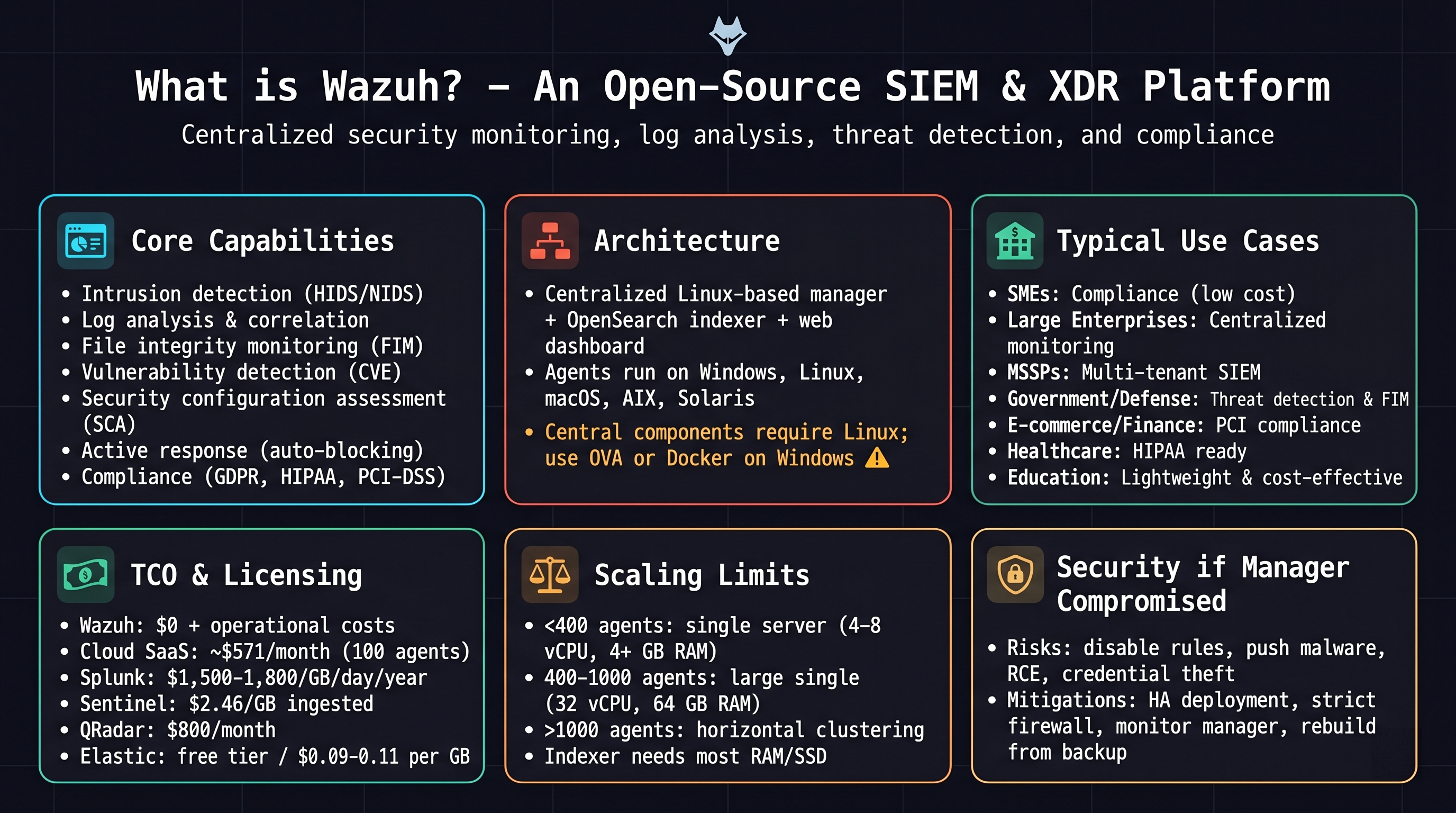
Use‑case distribution
Annual cost (100 agents)
Estimated costs vary based on ingestion and deployment | Wazuh: $0 | Splunk: ~$18k |
Sentinel: ~$9k | QRadar: ~$9.6k | Elastic: ~$3.2k
Minimal requirements
Server: 4‑8 vCPU, 8‑16 GB RAM | Agent: 1‑2 vCPU, 1‑2 GB RAM
Wazuh Server (Ubuntu 22.04
LTS)
UFW Firewall
Enable UFW
sudo ufw enable
Agent (TCP 1514)
sudo ufw allow 1514/tcp
Agent (UDP 1514)
sudo ufw allow 1514/udp
Enrollment (1515)
sudo ufw allow 1515/tcp
API (55000)
sudo ufw allow 55000/tcp
HTTPS Dashboard
sudo ufw allow 443/tcp
HTTP redirect
sudo ufw allow 80/tcp
Indexer HTTP
sudo ufw allow 9200/tcp
Indexer transport
sudo ufw allow 9300/tcp
Filebeat
sudo ufw allow 5044/tcp
Reload rules
sudo ufw reload
All-in-One Install
Official installer (latest stable 4.x)
curl -sO https://packages.wazuh.com/4.x/wazuh-install.sh && sudo bash ./wazuh-install.sh -a
Enable services
sudo systemctl daemon-reexec
sudo systemctl restart wazuh-indexer
sudo systemctl restart wazuh-manager
sudo systemctl restart wazuh-dashboard
Password Reset (Wazuh Dashboard)
Reset all Wazuh passwords (auto‑generated for admin, kibanaserver, API users)
sudo /usr/share/wazuh-indexer/plugins/opensearch-security/tools/wazuh-passwords-tool.sh
Set custom admin password (change the example password)
sudo /usr/share/wazuh-indexer/plugins/opensearch-security/tools/wazuh-passwords-tool.sh -u admin -p 'Admin@123#Secure'
Restart Dashboard
sudo systemctl restart wazuh-dashboard
Access Dashboard
https://<SERVER-IP>
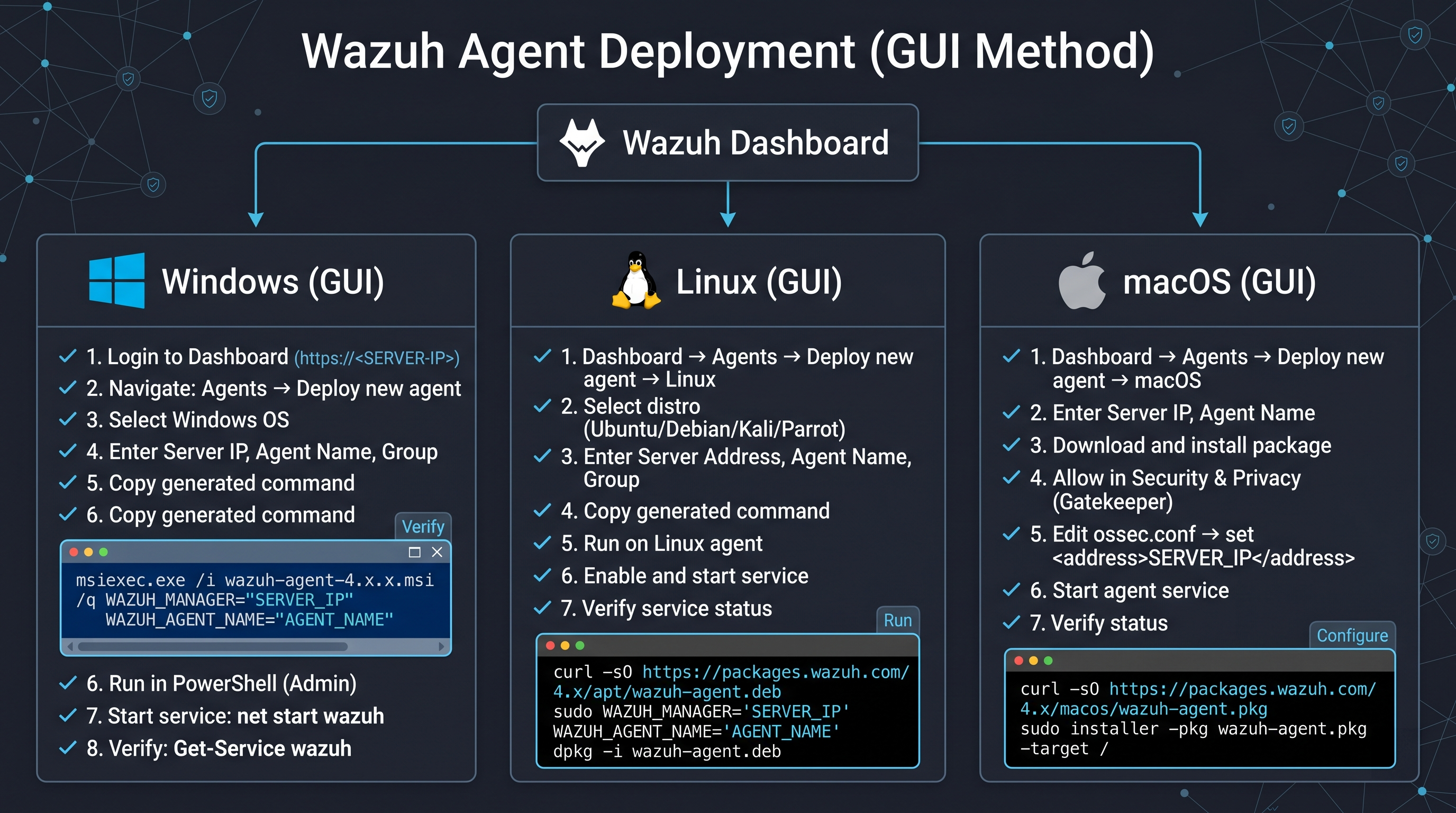
Deploy Agents via Wazuh
Dashboard (GUI Method)
Download MSI (latest
4.14.x)
Quick Install Commands
(Manual Copy & paste)
Windows Agent
Step 1: Download Agent
Invoke-WebRequest -Uri https://packages.wazuh.com/4.x/windows/wazuh-agent-4.14.4-1.msi -OutFile $env:TEMP\wazuh-agent.msi
Step 2: Install (Silent + Configure Manager)
msiexec.exe /i $env:TEMP\wazuh-agent.msi /q WAZUH_MANAGER="MANAGER_IP" WAZUH_AGENT_NAME="PC-NAME"
Step 3: Start Service
net start wazuh
Step 4: Verify Agent
Get-Service wazuh
Step 5: Check Logs
Get-Content "C:\Program Files (x86)\ossec-agent\ossec.log" -Tail 20
❌ Restart service (troubleshooting)
net stop wazuh && net start wazuh
❌ Check connectivity
Test-NetConnection MANAGER_IP -Port 1514
🗑️ Remove Agent
msiexec /x $env:TEMP\wazuh-agent.msi /q
Linux Agent
Step 1: Download Agent
wget https://packages.wazuh.com/4.x/apt/pool/main/w/wazuh-agent/wazuh-agent_4.14.4-1_amd64.deb
Step 2: Install + Configure (One-Liner)
sudo WAZUH_MANAGER='MANAGER_IP' WAZUH_AGENT_NAME='AGENT-NAME' dpkg -i ./wazuh-agent_4.14.4-1_amd64.deb
Step 3: Enable & Start Agent
sudo systemctl daemon-reexec && sudo systemctl enable --now wazuh-agent
Step 4: Verify Status
sudo systemctl status wazuh-agent
Step 5: Check Logs
sudo tail -f /var/ossec/logs/ossec.log
❌ Restart agent
sudo systemctl restart wazuh-agent
❌ Check connectivity
ping MANAGER_IP && nc -zv MANAGER_IP 1514
🗑️ Remove Agent
sudo systemctl stop wazuh-agent && sudo apt remove wazuh-agent -y && sudo rm -rf /var/ossec
macOS Agent
Step 1: Download Agent
curl -O https://packages.wazuh.com/4.x/macos/wazuh-agent-4.14.4-1.pkg
Step 2: Install Package (may require Gatekeeper override)
sudo installer -pkg wazuh-agent-4.14.4-1.pkg -target /
Step 3: Configure Manager IP (edit <address>)
sudo nano /Library/Ossec/etc/ossec.conf
Step 4: Start Agent
sudo /Library/Ossec/bin/wazuh-control start
Step 5: Verify Status
sudo /Library/Ossec/bin/wazuh-control status
Step 6: Check Logs
sudo tail -f /Library/Ossec/logs/ossec.log
❌ Restart agent
sudo /Library/Ossec/bin/wazuh-control restart
🗑️ Remove Agent
sudo /Library/Ossec/bin/wazuh-control stop && sudo rm -rf /Library/Ossec
Manual Agent Creation (Wazuh Server)
PART 1: Create Agent & Extract Key
Open manage_agents (server)
sudo /var/ossec/bin/manage_agents
- Press A → Add agent
- Enter Agent Name
- Enter Agent IP
- Press Enter for auto ID
- Confirm with y
- Press E → Extract key
- Select agent ID
- Copy full key
Example key
MDAxIGV4YW1wbGUga2V5IHN0cmluZw==
Important
Ensure correct IP is used
Key must be copied completely
Port 1514 must be open
PART 2: Add Key on Agent
Linux
sudo /var/ossec/bin/manage_agents → I → paste key
Windows
manage_agents.exe → I → paste key
macOS
sudo /Library/Ossec/bin/manage_agents → I → paste key
Important
Verify Manager IP in ossec.conf
Linux path: /var/ossec/etc/ossec.conf
PART 3: Start / Restart Agent
Linux
sudo systemctl restart wazuh-agent
Windows
net stop wazuh && net start wazuh
macOS
sudo /Library/Ossec/bin/wazuh-control restart
Note
Restart required after key import
If issue → restart manager also
PART 4: Verify & Troubleshoot
List agents
sudo /var/ossec/bin/agent_control -l
Expected Status: Active
Dashboard → Agents → Active
Logs
/var/ossec/logs/ossec.log
- Check firewall:
sudo ufw status - Port test:
nc -zv MANAGER_IP 1514 - Remove agent: manage_agents → R
Common Issues
Wrong IP
Port blocked
Key mismatch
Agent not restarted
Manual Internal
Users Creation using Wazuh CMD
PART 1: Edit YAML Files
internal_users.yml
sudo nano
/etc/wazuh-indexer/opensearch-security/internal_users.yml
roles.yml
sudo nano
/etc/wazuh-indexer/opensearch-security/roles.yml
roles_mapping.yml
sudo nano
/etc/wazuh-indexer/opensearch-security/roles_mapping.yml
PART 2: Generate Hash
Run hash tool
sudo
/usr/share/wazuh-indexer/plugins/opensearch-security/tools/hash.sh
Example hash for password Soc-l1
$2y$12$CbGGH.wbuPAi1y/Ug2mxduxnJdWdwwuPMcGAjcS2BCjfXFzV/bhLi
PART 3: Add Auditor User
Append to internal_users.yml
auditor:
  hash: "$2y$12$CbGGH.wbuPAi1y/Ug2mxduxnJdWdwwuPMcGAjcS2BCjfXFzV/bhLi"
  reserved: false
  backend_roles:
    - "kibanauser"
    - "readall"
  description: "SOC Auditor Read Only User"
PART 4: Apply & Restart
Run securityadmin
sudo /usr/share/wazuh-indexer/plugins/opensearch-security/tools/securityadmin.sh -cd
/etc/wazuh-indexer/opensearch-security/ -h 127.0.0.1 -nhnv -cacert /etc/wazuh-indexer/certs/root-ca.pem -cert
/etc/wazuh-indexer/certs/admin.pem -key /etc/wazuh-indexer/certs/admin-key.pem
Restart indexer & dashboard
sudo systemctl restart wazuh-indexer
sudo systemctl restart wazuh-dashboard
PART 5: Verify
Check services
sudo systemctl status
wazuh-indexer wazuh-dashboard
Login with auditor / Soc-l1 (read‑only)
Filebeat Authentication Fix (After Password Change)
PART 1: Flow + Root Cause
Data Pipeline
Agent → Manager → alerts.json → Filebeat → Indexer → Dashboard
Filebeat uses secure variables from keystore
username: ${username}
password: ${password}
Root Cause
Password changed in Indexer        → Updated
Filebeat keystore                 → OLD password
Authentication                    → Failed (401)
Logs ingestion                    → Stopped
Important
If you changed admin password using hash replacement,
you MUST update Filebeat keystore.

Reason:
Wazuh Manager & Filebeat use same username and password.
PART 2: Fix (Recommended - Secure)
Step 1: List stored secrets
sudo filebeat keystore list
Step 2: Update password
sudo filebeat keystore add password
Step 3: Re-add username (optional)
sudo filebeat keystore add username
Step 4: Restart Filebeat
sudo systemctl restart filebeat
PART 3: Verification
Check logs
sudo tail -f /var/log/filebeat/filebeat
Expected Result:
- No "401 Unauthorized"
- Successful connection to Indexer
Final Test
logger "WAZUH FINAL TEST"
Go to Dashboard → Discover
Time Range → Last 15 minutes

Logs should appear successfully.
PART 4: Alternative (Quick Fix)
Replace in filebeat.yml
username: "admin"
password: "Ashok-123"
Restart Filebeat
sudo systemctl restart filebeat
Note:
This method is not secure (plain text credentials).
Use only for testing.
Common Errors & Fixes
Agent Never Connects
- Firewall: ensure ports 1514/1515 open on server (
sudo ufw status) - Wrong manager IP in
ossec.conf - Agent cannot resolve manager hostname
- Check logs: Linux
/var/ossec/logs/ossec.log, WindowsC:\Program Files (x86)\ossec-agent\ossec.log
Key Import Fails
- Copy the full key without extra spaces or line breaks
- Re‑extract key from server (remove agent, add again)
- Ensure you are using
manage_agentsas root/sudo
Port / Connectivity Issues
- Test connectivity:
nc -zv MANAGER_IP 1514(Linux/macOS) orTest-NetConnection MANAGER_IP -Port 1514(Windows) - Verify service listening on manager:
ss -tlnp | grep 1514 - Check cloud security groups / network ACLs
Service Not Running / Fails to Start
- Linux:
sudo systemctl restart wazuh-agentthenjournalctl -u wazuh-agent -f - Windows:
net stop wazuh && net start wazuh, check Event Viewer - macOS:
sudo /Library/Ossec/bin/wazuh-control restart
Agents Successfully Connected with Wazuh-Server - Final Verification
On Server
List all agents, check status = Active
sudo /var/ossec/bin/agent_control -l
On Dashboard
Navigate to Agents → Active to see connected agents
Custom Detection Rules – Categories
Authentication & Access Control
- 100200Windows failed login (4625)
- 100201SSH failed login
- 100202Windows successful login (4624)
- 100203Brute force (8+ failures / 60s)
- 100204Windows account lockout (4740)
- 100205Privilege escalation (admin login, 4672)
- 102200RDP login detected (logon type 10)
- 100206SSH successful login
- 100207SSH invalid user attempt
User & Group Management
- 100500User account created (4720)
- 100501User account deleted (4726)
- 100502Password change/reset (4723/4724)
- 100503User added to security group (4728/4732/4756)
- 100504Admin privilege assigned (4732 + "Administrators")
- 100505Suspicious account creation with plaintext password
Process Execution & Malware
- 100300Suspicious process location (Temp/AppData)
- 100301Suspicious parent‑child relationship
- 100302Unknown binary created/modified (FIM)
- 100303Potential reverse shell (nc, bash -i, etc.)
- 100304Encoded command execution (-EncodedCommand, base64)
- 100305LOLBin abuse (wmic, rundll32, mshta, regsvr32)
PowerShell & Script Abuse
- 100400PowerShell EncodedCommand usage
- 100401PowerShell Invoke‑Expression / IEX usage
- 100402PowerShell downloading content (DownloadString, WebClient)
- 100403General PowerShell script execution (4104)
- 100404Suspicious PowerShell obfuscation pattern
Persistence Mechanisms
- 100700Registry Run key modification
- 100701File added to startup folder
- 100702Scheduled task creation/modification (4698‑4702)
- 100703New service installed (4697/7045)
- 100704WMI persistence (FilterToConsumerBinding, ActiveScriptEventConsumer)
File Integrity & System Changes
- 100400 (hosts)Hosts file modified
- 100800Critical system file changed (/etc/passwd, /etc/shadow)
- 100801Unauthorized file creation (FIM)
- 100802System binary replaced or modified (C:\Windows\System32, /usr/bin)
- 100803Potential web shell upload (via web logs)
Windows Defender & Security
- 101100Windows Defender disabled/tampered (5007)
- 101101Antivirus tampering (5007/5010)
- 101102Windows Firewall rule changed (4946‑4948)
- 101103Security/audit policy changed (4719/4907)
Log & Audit Tampering
- 102000Security log cleared (1102)
- 102001Audit policy changed (4719)
- 102002Windows Event Log service stopped (7036/7040)
- 102003Event log manually cleared via wevtutil cl
Network Activity & C2 Detection
- 101600Suspicious DNS query to high‑risk TLD (.xyz, .tk, .ml, etc.)
- 101601Connection to known malicious IP (placeholder)
- 101602Potential C2 beaconing (repeated suspicious queries)
- 101603Possible reverse shell network traffic
- 101604Port scanning behavior detected
Web Attacks (VAPT)
- 102100SQL injection attempt (union, select, ' or '1'='1, sleep, etc.)
- 102101Cross‑site scripting (XSS) attempt
- 102102Local/Remote file inclusion (../, file://, php://filter)
- 102103Directory traversal attempt (../, %2e%2e%2f)
- 102104Web application brute force login (POST to login/signin)
- 102105Suspicious file upload (potential web shell)
- 102106Command injection attempt (; ls, | id, cmd, $(cmd))
SSH Monitoring (Linux)
- 103100SSH failed login
- 103101SSH root login failure
- 103102SSH root login success (sensitive)
- 103103SSH brute force attack (10+ failures / 60s)
- 103104SSH connection attempt with invalid username
Privilege Escalation
- 104100Sudo command executed (potential privilege escalation)
- 104101Failed sudo authentication attempt
- 104102Token manipulation / admin privilege assigned (Windows, 4672)
- 104103SetUID / SetGID bit set on file (chmod 4xxx / 2xxx)
Diagnostics & Removal
Diagnose Agent
Check agent IP address
hostname -I
Detailed network interfaces
ip a
Check agent status
sudo systemctl status wazuh-agent
View agent logs
sudo tail -f /var/ossec/logs/ossec.log
Edit config (fix <address>)
sudo nano /var/ossec/etc/ossec.conf
Ping manager
ping <MANAGER_IP>
Re-register agent
sudo /var/ossec/bin/agent-auth -m <MANAGER_IP>
Diagnose Server
List all agents
sudo /var/ossec/bin/agent_control -l
Live manager logs
sudo journalctl -u wazuh-manager -f
Restart all services
sudo systemctl restart wazuh-manager wazuh-indexer wazuh-dashboard
Check listening ports
ss -tulnp | grep -E '1514|1515|55000|9200|9300'
🗑️ Agent Removal
Stop agent service
sudo systemctl stop wazuh-agent
Uninstall Wazuh agent
sudo apt remove wazuh-agent -y
Purge agent completely
sudo apt purge wazuh-agent -y
Remove residual files
sudo rm -rf /var/ossec
Remove wazuh user (if exists)
sudo deluser wazuh
Remove wazuh group (if exists)
sudo delgroup wazuh
Remove agent from server (interactive)
sudo /var/ossec/bin/manage_agents
🗑️ Complete Server Removal
Uninstall Wazuh
sudo bash wazuh-install.sh -u
Purge residual files
sudo rm -rf /var/ossec /var/lib/wazuh-indexer /var/lib/wazuh-dashboard
Remove users
sudo userdel -r wazuh-manager wazuh-indexer wazuh-dashboard
Indexer Diagnostics &
Troubleshooting (Disk/Memory)
Step 1: Error & Log Analysis
Detailed service status
systemctl status wazuh-indexer -l
Last 30 journal lines
journalctl -xeu wazuh-indexer.service | tail -30
Indexer logs
tail -n 50 /var/log/wazuh-indexer/wazuh-indexer.log
Check port conflicts
ss -tulnp | grep -E '9200|9300'
Step 2: Memory & Disk Usage
RAM & swap usage
free -h
Disk usage
df -h
Largest folders
du -h --max-depth=1 / | sort -hr | head -n 10
Wazuh data usage
du -sh /var/log/wazuh-indexer /var/lib/wazuh-indexer
Step 3: Cleanup & Truncate
Vacuum journals (keep 2 days)
journalctl --vacuum-time=2d
Remove rotated logs
rm -rf /var/log/*.gz /var/log/*.[0-9]
Clean apt cache
apt clean && apt autoremove -y
Truncate indexer logs
truncate -s 0 /var/log/wazuh-indexer/*.log
Step 4: Fixes & Restart
Kernel parameter
sysctl -w vm.max_map_count=262144 ...
Edit JVM heap (reduce to 512m)
nano /etc/wazuh-indexer/jvm.options
Add 2GB swap
fallocate -l 2G /swapfile ...
Fix permissions
chown -R wazuh-indexer:wazuh-indexer ...
Restart after fixes
systemctl restart wazuh-indexer
If disk full → expand EBS or cleanup. Small EC2 often needs swap + vm.max_map_count.
Force Uninstall
Wazuh-Server & Cleanup Guide
Step 1: Stop Services & Processes
Stop all Wazuh services
sudo systemctl stop wazuh-manager wazuh-indexer wazuh-dashboard filebeat
Disable services
sudo systemctl disable ...
Kill Wazuh processes
sudo pkill -f wazuh
Kill Filebeat
sudo pkill -f filebeat
Kill OpenSearch
sudo pkill -f opensearch
Step 2: Force Remove Packages
Check installed packages
dpkg -l | grep wazuh
Force remove broken manager
sudo dpkg --remove --force-remove-reinstreq wazuh-manager
Purge all Wazuh packages
sudo dpkg --purge --force-all ...
Fix error 127 (pre-removal script)
sudo rm -rf /var/lib/dpkg/info/wazuh* && sudo dpkg --configure -a
APT purge (clean way)
sudo apt-get remove --purge ... -y
Autoremove & clean
sudo apt-get autoremove -y && sudo apt-get autoclean
Step 3: Delete Files & Systemd
Remove /var/ossec
sudo rm -rf /var/ossec
Remove configs
sudo rm -rf /etc/filebeat /etc/wazuh*
Remove data/logs
sudo rm -rf /var/lib/wazuh-indexer /var/log/wazuh*
Remove systemd leftovers
sudo rm -rf /etc/systemd/system/wazuh*
Reload systemd
sudo systemctl daemon-reexec && sudo systemctl daemon-reload
Clean backup files (optional)
rm -rf ~/wazuh-backup ...
Step 4: Verify Clean System
Check files (should show 'No such file')
ls /var/ossec ...
Check packages (no output)
dpkg -l | grep wazuh
Check services (none)
systemctl list-units --type=service | grep wazuh
Check ports (no listening)
ss -tulnp | grep -E '55000|1514|1515'
Important: Keep only
~/client.keys.backup — contains agent
IDs, names, and keys for restore.